Sa firmware for the M-VAVE FM-1
JIANTFM
bio·synthetic · operating · system
enter the organism ↓A free firmware that turns the FM-1 into a complete instrument: six tracks, eleven synthesis engines plus one for your audio input, a deep sequencer and effects, all inside the little keyboard. Install it from your browser in a couple of minutes, and go back to the official firmware whenever you want.
Current version: …
New in this version: songs as TIMELINE, PARTS and CLIPS · velocity and aftertouch on the FM-1's own keys · DRUM-X fills and chromatic drums · new GENE genres (cumbia, phonk, baile funk, hip hop, jazz…). It keeps 6 songs (8 before): back up before you update.
JIANT Studio
Everything in one page
Install, edit, see the FM-1's screen big, play the emulator, record stems and MIDI, keep your projects and backups, learn how every engine works and rescue a bricked FM-1: for JIANT FM and JIANT BYTE, in your browser, on a computer or a phone.
- Installthe firmware, safely, with a backup first
- Editorevery sound and setting on screen
- Screenthe FM-1's screen, full screen on your phone
- Emulatorthe real firmware, playable, with MIDI
- Recordmaster or stems, WAV and MIDI, like a DAW
- Projectsslots A–D and backups by hand
- How it worksevery engine, sequencer and effect, animated
- Rescuean RP2040 brings a bricked FM-1 back
Start here
Three steps, no coding
Everything runs in the browser. You don't need to install any program, and you can try JIANT before touching your FM-1.
Try it in the browser
The emulator runs the real firmware on your computer or phone. Play with the keyboard, load a song, hear every engine.
- No FM-1 needed
- Renders the stems of a song from your backup
Install it on your FM-1
Open the installer in Chrome or Edge, connect the FM-1 with a USB data cable, press Install and wait without unplugging.
- The installer checks your FM-1 first and saves a backup
- Coming from another custom firmware? Return to official first, with the installer's button (official V16 and V15 both work)
Edit and back up
The web editor shows your sounds and settings on the computer screen while the FM-1 keeps playing.
- Send DX7 banks to FM6, manage presets
- Back up every project with one click
Needs: Chrome or Edge on a computer (WebUSB and Web MIDI) · a USB cable that carries data, not only charge.
What's inside
One organism, a species per engine
Each engine is a species, drawn by the firmware itself. On HOME every track is a creature of its engine's species: its shape comes from its knobs, and it swells and heats up with its own audio.
Eleven of the twelve engines (EXT plays your audio), as the FM-1 draws them
12 engines
ANALOG, FM6 (six operators, 32 algorithms, DX7 banks), PHASE, MATH (bytebeat and floatbeat), VOICE (it sings words in Spanish, English and Japanese), WHEEL, NOISE, ANIMAL (birds, insects and frogs from physical models), STRING (a plucked, struck or bowed string, and guitar feedback), ADD (additive) and DRUM-X: no samples, everything is synthesized. And EXT, which plays a USB audio input on a track of its own (or SWARM, a melody out of the Bluetooth around): gated by the steps, ring-modulated, crushed, and followed as a modulation source.
DRUM-X
A drum kit of eight synthesized sounds, each with two sides: MORPH moves the whole kit from one to the other, live. The EXTENDED key map gives every octave a job: real fills above, the kick, the tom or any sound played chromatically below, ratchets and flams. A classic CMOS cowbell, kicks that punch.
64-step sequencer
A piano roll per track, chords, probability, ratchets, extra playheads, recording off the grid to a 64th of a step, and EUCLID, which writes euclidean patterns live: a whole drum kit from one DENSITY knob or lane by lane, melodies in key, VARY turns that answer each other, and MUTATE, which evolves the pattern on the bar.
Effects and master
Delay (its right echo can take a time of its own), five reverbs (SHIMMER, RESO, CLOUD…), chorus, slicer, live punch-in effects, a DJ filter on the whole mix and a master with limiter, clip, punch, tape and a 4-band EQ.
Songs and the generator
Six songs of four parts each: TIMELINE draws the song and opens each row track by track (another part, a variation, a mute), PARTS loops one part, CLIPS launches parts track by track on the next bar. And GENE, a generator that writes a whole song idea: from a genre (cumbia, phonk, baile funk, hip hop, jazz…), or in EXPLORE, breaking every rule.
USB audio and MIDI
The FM-1 becomes an audio interface that keeps its time: every track on its own channel into your DAW (STEMS), ready to record each part on its own, and the computer's audio back in (IN+OUT). MIDI over USB, TRS and Bluetooth: play it from a phone or tablet app with no cable, and PROX turns how close the phone is into a modulation source. USB HOST (experimental): a USB-MIDI keyboard or a USB audio interface plugged straight in.
A separate product: coming soonV10 on screen
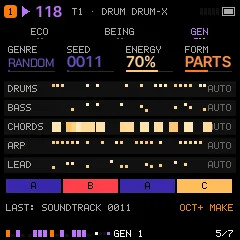
The real screens, moving
Recorded from the firmware itself, running on a simulated FM-1 while a song from the generator plays: nothing redrawn. Every page draws what it does.
Find your way
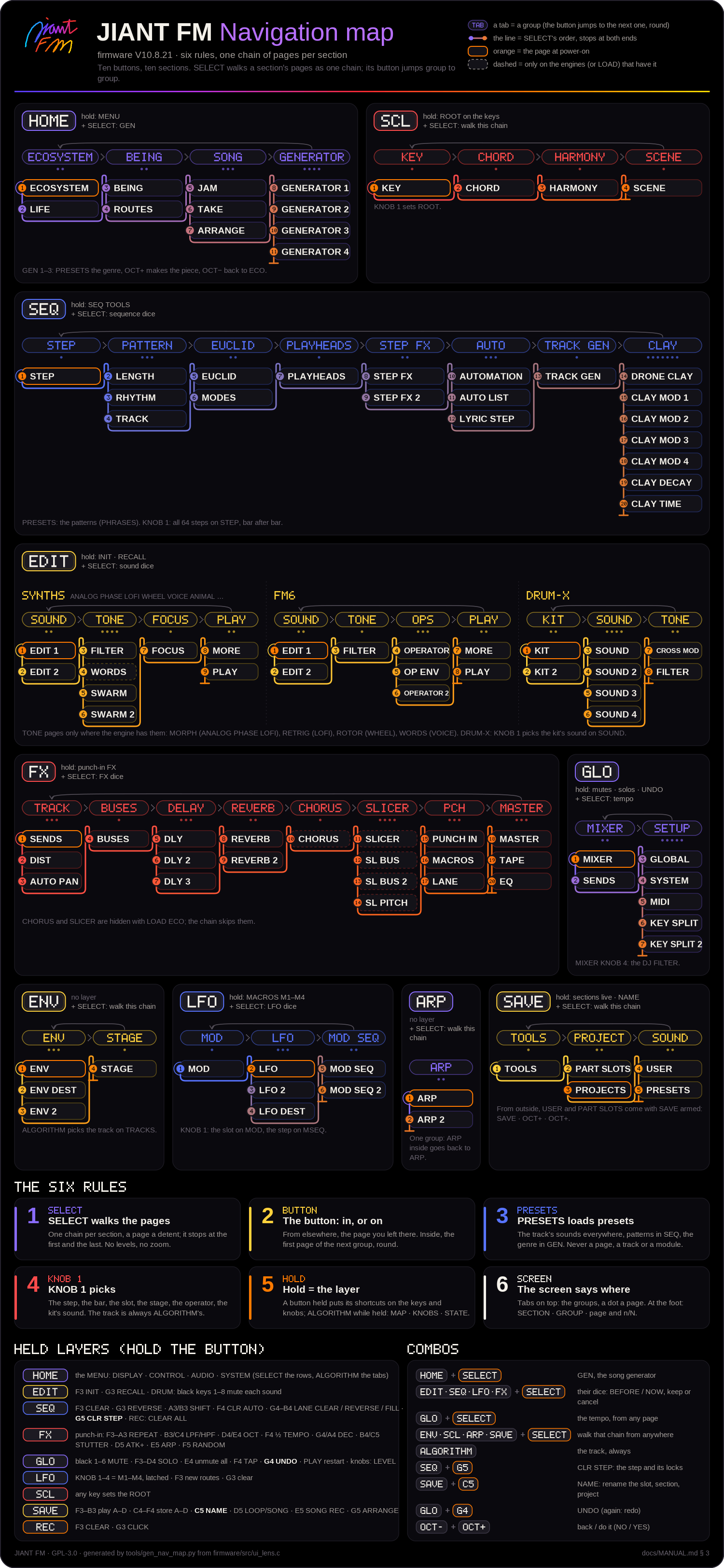
Six rules, one map
Since 0.9.2 every section works the same way: learn six rules once and the whole synth is known, in any of the four skins (AIR, COLORS, BOTTOM, HUD). The map shows each button's groups and pages in the order SELECT walks them. It was drawn at 0.9.18 and V10 has moved some pages since (SEQ opens on STEP and has EUCLID, SAVE opens on TIMELINE, GLO has COMPS, EDIT ends with VOICE): the interactive manual's map follows V10.
SELECT walks the pages
One chain per section, a page a detent; it stops at the first and the last page.
The button: in, or on
From another section, the page you left there. Inside, the first page of the next group, round.
PRESETS loads presets
The track's sounds everywhere, the patterns in SEQ, the genre in GEN. Never a page or a track.
KNOB 1 picks
The step, the bar, the slot, the stage, the kit's sound. The track is always ALGORITHM's.
Hold = the layer
A button held puts its shortcuts on the keys: SEQ + G5 clears a step, SAVE + C5 names, REC held alone undoes (again: redo). EDIT + PRESETS jumps between engines; held + SELECT: GEN, the dice, the tempo.
The screen says where
Tabs on top are the section's groups, a dot a page; the footer says SECTION · GROUP · page and n/N.
Frequency in nature
Matter is light, colour is frequency: a ladder from the solar cycle to gamma rays, and four sounding examples of how a synth already lives in it.
Learn
Manual and cheat sheets
The full manual explains every page and every knob. The cheat sheets fit the controls and the sound pages on one sheet each, to keep next to the FM-1.
The interactive manual
Touch any control of the FM-1 and see what it does alone, held and in combination, with the firmware's real screens. Search every command, follow step-by-step recipes, catch up on what's new.
User manual
Every page, layer and engine, in English.
manual.html → ESManual de usuario
The same manual, in Spanish.
manual.es.html → PDFControls cheat sheet
Buttons, layers and combinations on one page.
cheatsheet-controls.pdf ↗ PDFSound cheat sheet
Engines, filter, envelopes and effects on one page.
cheatsheet-sound.pdf ↗Coming next
Future upgrades
What is being built and tested in the lab right now. Dates depend on testing on real FM-1s.
| USB audio interfaces on HOST, Bluetooth AIR | TESTING |
| A separate product, coming soon | OUT · 1.0 |
| Live visuals | IN THE LAB |
| FX buses A–D, routed per track | IN THE LAB |
| JIANT on the SMK | PLANNED |
> more ideas from the community
Supporters play every new version first
People who support JIANT on Ko-fi or Cafecito get the new versions before they go public, and help decide what comes next.
Join on Ko-fiSupport
JIANT is free. If it makes music with you, buy me a coffee.
JIANT is made by Juan Jiant, a muralist and visual artist from Buenos Aires. Every contribution pays for development hours and keeps the firmware free for everyone.
FAQ
Before you install
Can I go back to the official firmware?
Yes. The installer has a button to return to the official firmware, V16 or V15 (you choose M-VAVE's official FM-1.fwsc). It saves a complete backup first.
Which browser do I need?
Chrome or Edge on a computer, for the installer and the editor: they talk to the FM-1 over USB. The emulator also works in other browsers and on phones.
Will I lose my sounds or projects?
Back them up with the editor before installing or changing version. The installer can also install earlier versions, but a project saved by a newer version may not open right in an older one. This version keeps 6 songs (8 before): songs 7 and 8 stay only in a backup made before updating.
The installer doesn't find my FM-1.
Use a USB cable that carries data (many cables only charge), connect it straight to the computer without a hub, and close other programs that use the FM-1 over MIDI.